GUTSY radio –
getting the tracklists with timestamps
MIXXX tracklists
The key to the rebroadcast is sending the metadata for each song in your recorded show at the exact time the recording is broadcast. This is accomplished (in MIXXX) in one of two ways, or another way in Auto DJ:
Cue files
You can set MIXXX to save the timestamp for each song you
play in your show while recording. This is accomplished by checking the “Create
a CUE sheet” checkbox in the
Recording section of the MIXXX preferences.
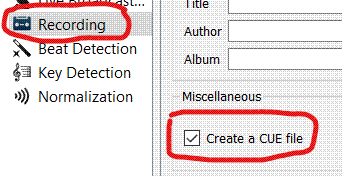
Once you set this in preferences, MIXXX will automatically create a cue sheet every time you create a new recording.
A cue sheet is a simple text file, and it looks something
like this:
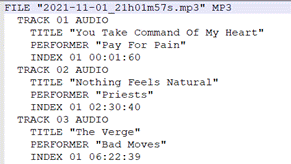
But what if you want a cue sheet for something you’ve recorded in the past? You can still get the timestamps for each song in a History file.
History files
A History file is a simple text file might look like this:
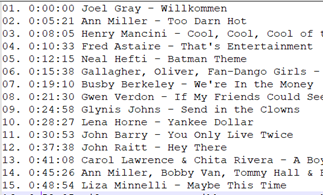
See also the Best Practices for creating tracklists below.
To make a History list for a previously-recorded show:
1.
In MIXXX, open the History twisty in the left nav.
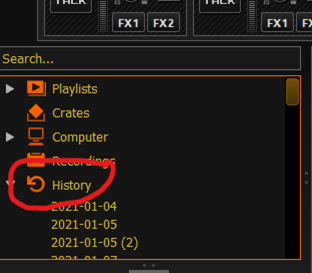
2.
Scroll down to the date of your show. If there’s a number in parens that
means you quit and restarted MIXXX on the same day. Find the one for your show.

3. Right click the date and choose Export playlist.
4.
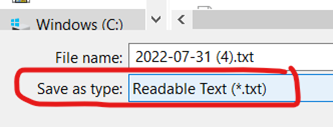
Change Save as Type to Readable text (*.txt). Also change the file name
if you want to.
5.
Open that file in a text editor. It should look something like this:
Best Practices for
creating tracklists in MIXXX
If
you haven’t already, turn on Cue sheets as instructed above. Nothing else needs
to be done.
If
you are working with History files:
Note that two things can throw the timestamps off so that they are out of sync with the recording times:
· If you play one or more songs before you start the broadcast, those songs will be at the top of your tracklist, and every subsequent song will have their times added to it. To avoid this, exit and restart MIXXX before you start your broadcast, and don’t play any songs until you’re live.
· If you talk at the beginning of your show before playing any music, the timestamps will be off by the amount of time you talk. To avoid this, start off the show with either a sweeper or a song before you talk. This will start the timecode logging.
If you are not using Cue sheets, the best practice is to reset MIXXX by exiting and restarting, and starting your show off with a sweeper or a song.
Getting the
tracklist from DJay Pro
- Select My Collections at the top of the list of sources on the left.
- Click on the export icon above the middle column, and choose export your tracklist as a CSV file.